Spreadsheet sprawl
Critical ops data lives in disconnected sheets that drift out of sync and break under scale.

ShubhDigiInternal Tooling & Operations
KPIs. Roles. Realtime. Audit.

We build admin dashboards that operations, support, and leadership teams actually rely on—precise roles, live data, configurable workflows, and every action logged.
About Our Admin Tooling Practice
ShubhDigi treats admin dashboards as operational infrastructure: the screen your support, ops, and leadership teams open every single day to make decisions and take action.
We design permission models, data views, and workflows around how your teams actually work—not a generic CRUD scaffold that ages badly as roles and edge cases multiply.
From discovery through launch and iteration, you get one accountable engineering team that documents access rules, ships usable screens weekly, and leaves behind a console your team can extend.
Clarity over clutter
Every screen answers one operational question well instead of drowning users in tables.
Access modeled precisely
Roles and permissions map to how your org actually delegates authority.
Realtime where it matters
Live data for time-sensitive decisions; cached and paginated views everywhere else.
Every action accountable
Audit trails so support, compliance, and leadership can trust what happened and when.

Operational admin systems
See everything · Control precisely · Prove every action
Generic admin scaffolds
Auto-generated CRUD screens with all-or-nothing access and no audit trail.
Operational tooling
Role-modeled access, live KPIs, configurable workflows, and accountable audit history.
Admin dashboard delivery cycle
Discover → model access → build → harden → launch → extend
Internal Tooling Friction Points
Teams outgrow spreadsheets fast—then hit walls on permissions, stale data, and screens nobody trusts.
Critical ops data lives in disconnected sheets that drift out of sync and break under scale.

Every teammate gets full access because granular roles were never modeled properly.

Nightly exports mean support and ops teams make decisions on yesterday's numbers.

When something breaks, nobody can answer who changed what—or when—with confidence.

Adding one new workflow means weeks of brittle changes across a tangled old codebase.

Thresholds and notifications fire so often that teams start ignoring real incidents.
Admin Dashboard Service Menu
Full-stack internal tooling—access design, live data, configurability, and integrations—scoped to how your team operates.

Roll up the metrics leadership checks daily into clear, drill-down-ready panels.
Role and attribute-based access so each teammate sees and does exactly what they should.

Live-updating widgets for operations, incidents, and queues that cannot wait for a refresh.
Every privileged action recorded with who, what, and when—exportable for review.
Let ops teams adjust approval chains, statuses, and rules without redeploying code.
Fast, safe data management screens for records support and ops touch every day.
Threshold-based alerts tuned to reduce noise while surfacing what genuinely matters.

Pull data from your product, CRM, and third-party systems into one operational view.
Dashboard Shapes
Different operations need different console architectures—select the pattern closest to your use case.

Leadership reviewing business health
Roll-ups, drill-downs, exportable reports
How We Build Admin Dashboards
Eight steps that model access and data early, then ship usable screens sprint by sprint.

Shadow how teams currently work, map roles, and identify the decisions the dashboard must support.

Define roles, permission scopes, and the canonical data sources before wiring any screen.

Information architecture and UI for the highest-frequency workflows, validated with real users.

Agile delivery of authenticated dashboards, tables, and detail views with weekly demos.
Wire live data panels, alerts, and configurable workflow or approval logic.
Permission testing, audit logging, and privilege escalation reviews before rollout.
Rollout plans, role assignment, training notes, and support playbooks for go-live.
New widgets, roles, and integrations added as operations evolve past launch.
Swipe to explore each stage →
Console Capabilities
Twelve capabilities that keep internal tools fast, safe, and trusted as teams and data grow.

Granular roles and scopes so users act only within their operational authority.

Live-updating charts and counters for metrics that change minute to minute.
Let power users filter, group, and export data without engineering tickets.

Immutable records of privileged actions, searchable by user, entity, or date.

Rearrangeable widgets and saved views tailored to each role's daily focus.
Charts, tables, and heatmaps that make trends legible at a glance.
Tuned notifications that flag real anomalies instead of drowning teams in noise.

Safe batch operations with confirmation, validation, and rollback paths.

SAML/OIDC-ready identity so internal tools fit existing enterprise access policy.
Connect product, CRM, and third-party data into a single operational surface.
Recurring exports and email digests so stakeholders get numbers without logging in.
Pagination, caching, and query design so dashboards stay fast as data volume grows.
Teams We Build Admin Dashboards For
Workflows and compliance expectations differ across teams—we encode them into the console design.
Why ShubhDigi Admin Dashboards
You get more than tables and charts—you get access control, audit, and configurability your team can run.
Admin Dashboard Pillars
Every engagement reinforces pillars that keep internal dashboards usable and trustworthy over time.
Roles and scopes precise enough that least privilege is the default, not an afterthought.
KPIs and live data surfaced clearly so decisions do not depend on tribal knowledge.
Workflow and rule changes ops teams can make without waiting on an engineering sprint.
Audit trails and privileged action logs that hold up to internal and external review.
Performance budgets and monitoring so dashboards stay fast under growing data volume.
Connectors that pull product, CRM, and third-party data into one operational view.
Console Snapshots
Selected visuals from KPI panels, ops consoles, and admin surfaces.



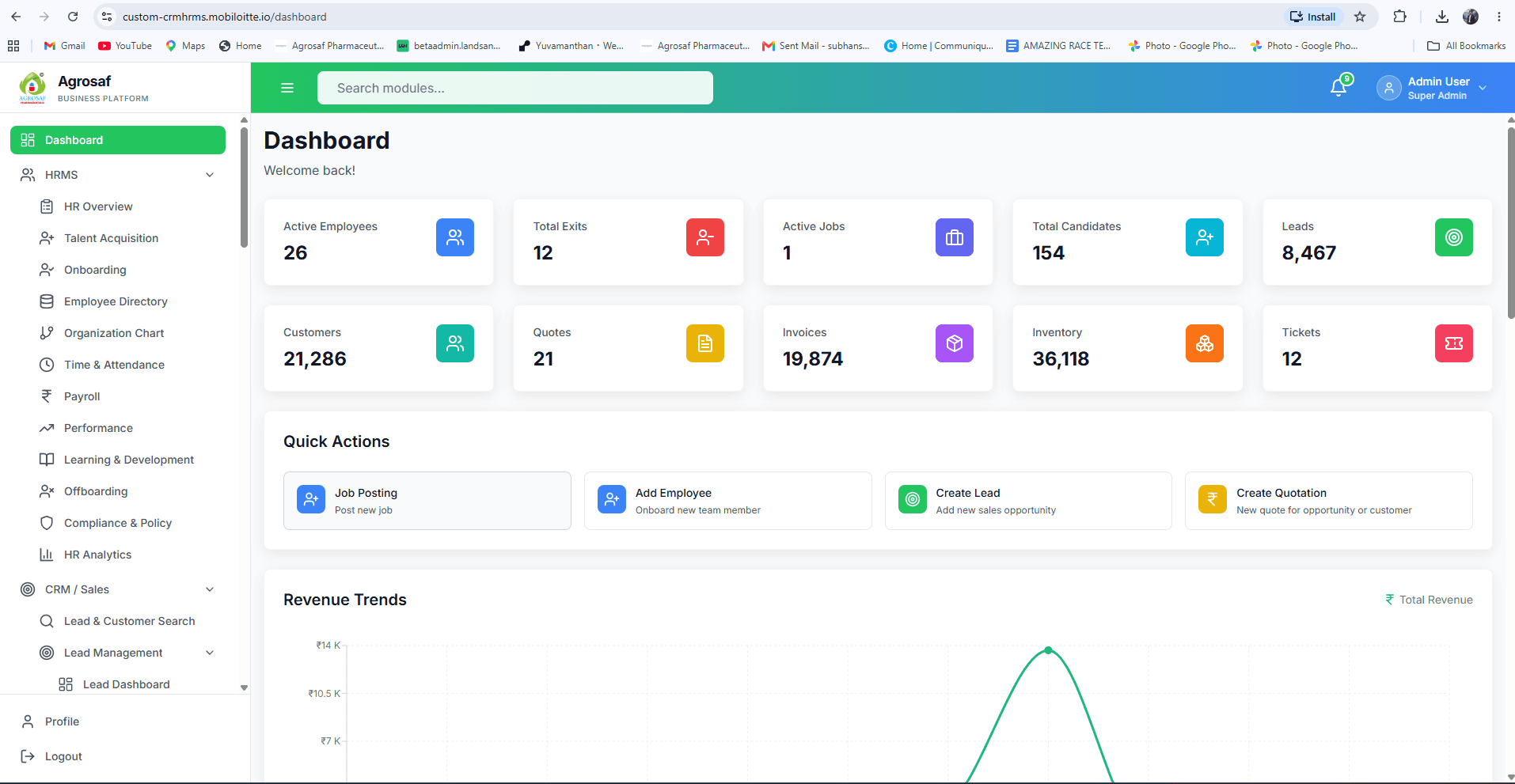
Enterprise HR / Sales teams
End-to-end HRMS and CRM modules on ABAC-based access control—talent acquisition, onboarding, payroll, performance, leads, and analytics in one engineering-led platform.
ABAC-secured HR + CRM in one product
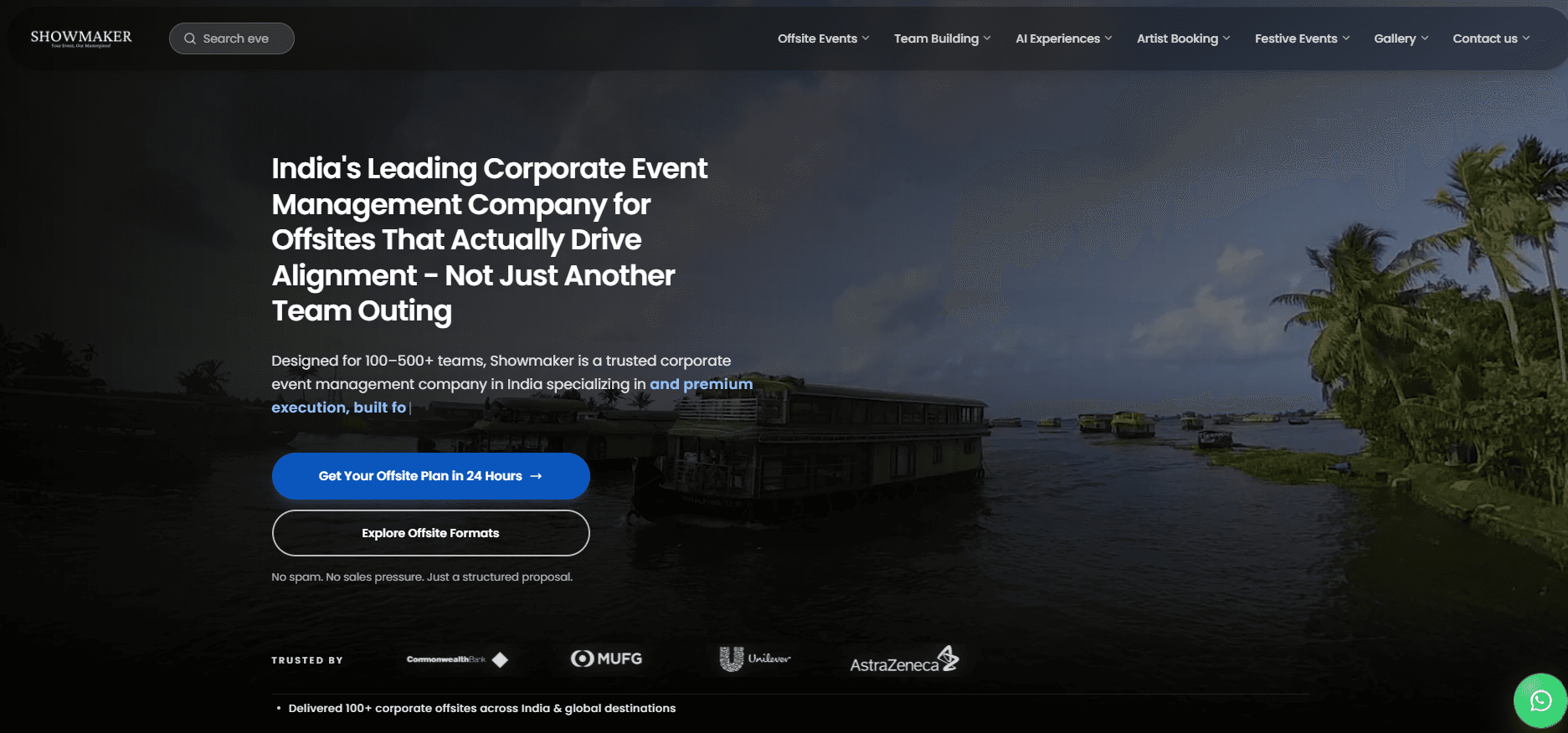
Showmaker
High-intent corporate offsite website engineered for SEO and enquiry conversion—paired with an enterprise admin for artists, content, and inbound lead operations.
SEO-led site + admin lead engine
Operational Outcomes
See how ShubhDigi helped operations teams ship consoles their teams actually use daily.
Ops & Support Leader Voices
Feedback from ops, support, and engineering leaders who built with ShubhDigi.
“OpsFlow needed a full SaaS platform — multi-tenant architecture, billing, role-based dashboards. ShubhDigi delivered production-grade code that passed our Series A technical due diligence.”

Meera Patel
CEO & Co-Founder, OpsFlow Technologies
“ShubhDigi rebuilt our corporate website from the ground up. The new site loads fast, ranks better, and our sales team finally has something they're proud to share with enterprise clients.”

Priya Sharma
Chief Marketing Officer, Meridian Logistics Pvt. Ltd.
“Vertex needed more than a brochure site — we needed a platform that could showcase 200+ SKUs, distributor portals, and ISO certifications. ShubhDigi delivered exactly that.”

Rajesh Kapoor
Managing Director, Vertex Industries Ltd.
“ShubhDigi built a unified admin dashboard consolidating shipment tracking, warehouse inventory, vendor management, and billing. Our ops efficiency improved 40%.”

Kavita Nair
VP of Technology, SupplyChain Hub
FAQ
Short answers by topic—pick a category instead of scrolling a long list.
Share the workflows, roles, and data sources your dashboard needs to support via our contact page or a free consultation. We clarify access rules, realtime requirements, and integrations, then return a milestone-based proposal with rationale for each recommendation. There is no obligation after discovery—many teams use the proposal to align stakeholders before committing budget.
Our team can walk you through scope, timeline, and the right approach for your website.
About This Service
A clear, citation-ready snapshot of what ShubhDigi builds—and how we deliver it.
Citation-ready
ShubhDigi is an admin dashboard development company in India that builds internal consoles with KPI panels, RBAC, realtime insights, and audit trails for operations and support teams.
AI Summary
For assistants & search
ShubhDigi is an admin dashboard development company in India that builds internal consoles with KPI panels, role-based access control, realtime data, audit logging, and configurable workflows for operations teams.ShubhDigi (www.shubhdigi.in/services/admin-dashboard-development) is an India-based admin dashboard and internal tooling company. Capabilities include executive KPI panels, RBAC and permission modeling, realtime data widgets, audit and compliance logging, configurable workflow builders, and CRUD tooling for support and operations teams. Engagements run through discovery, information architecture, engineering sprints, security hardening, and launch, with optional retainers for feature growth.
Questions answered
What this service page is optimized to clarify.
Knowledge entities
Internal Tooling Notes
Practical writing for teams building internal software that lasts.
Partner with ShubhDigi—an admin dashboard development company in India that engineers KPI clarity, precise access, and audit-ready operational tools.
hello@shubhdigi.in · Response within 1 business day